Zoom Tips & Tricks
Zoom Tips & Tricks
Zoom is provided free of charge for current faculty, staff, students, and affiliates at all Cornell campuses. You automatically have a Cornell Zoom account. Just install the software and you'll be ready to go! Make sure you are logging in through the official Cornell Zoom page to get access to all Zoom features.
The Campus Activities Office wants to help make the most of your Zoom experience.
Zoom Guide on General Tips & Safety Features
Take extra measure to avoid "Zoombombers" and other security issues. Cornell put together this helpful guide of various security measures you should consider when holding a Zoom meeting or event.
This guide includes tips for:
- Basic Zoom set-up
- Accessibility
- Interactive
- Preventing "Zoom-bombing" (unwanted intrusion)
- Fun tips for Zoom
Bias Reporting Through Zoom
If your meeting, lecture, or event finds itself with unwanted intrusion that includes any bias-related issues, please consider the following:
- Report the issue to Cornell SSIT
- Report the issue as a Cornell Bias Report
If you report through both structures, please make a note saying that you are reporting both ways, so Cornell knows it is one issue.
Did you know you can change your Zoom Background?
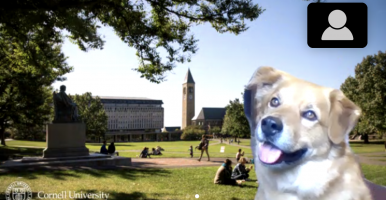
This feature was created to hide what's behind you in case you can't find a blank wall. Why not make it fun? Whether you're missing campus, want to virtually hangout on the slope at sunset, or study outside on the arts quad -- we're here for you!
Note: your computer or phone may not be compatible with this feature.




We have also created standard backgrounds as well:

To download our backgrounds:
- Click this link to access our CampusGroups folder of backgrounds
- Download all: click the "Download as .zip" in the upper right corner
- Download individual image: click the image title and it will automatically download
To change your Zoom background:
- In your Zoom meeting
- Select the arrow to the right of the Video button in the bottom left part of your screen
- Select "Virtual background"
- In your overall settings
- Open your Zoom application
- Go to settings, then "virtual background"
- Click the + button, and select your new background!
- You may have to deselect "mirror my video"
Hanging out with our backgrounds? Use #CornellUniversity to share with everyone!
You can be just like Cedric with these filters brought to you by the Cornell University Campus Activities Office!